
Key takeaways:
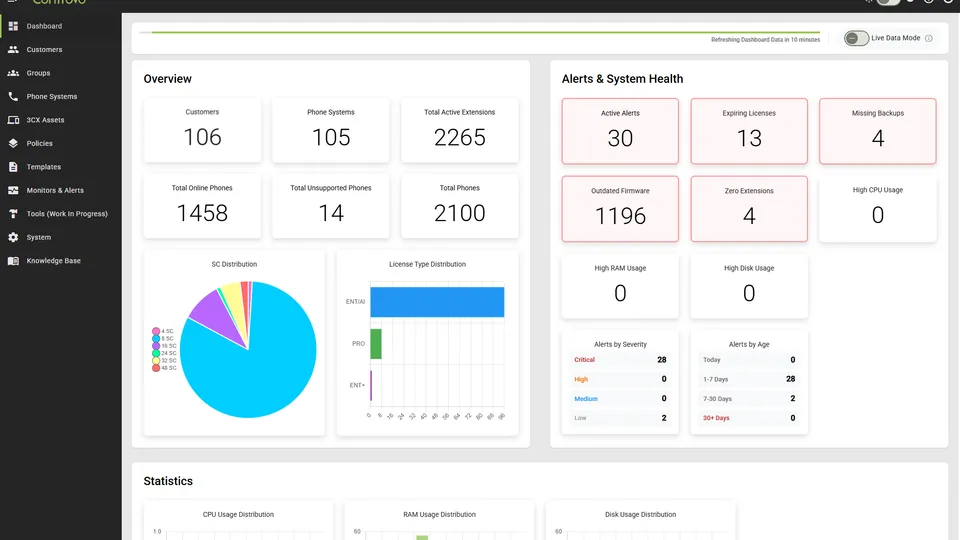
- The Controvo dashboard is redesigned from the ground up with a new tile layout and new widgets
- Drilldown on any gauge to see exactly which systems are driving the number
- New SC Distribution pie chart shows how your managed portfolio breaks down at a glance
- Hide widgets you don’t use — layout saves per user, company defaults coming soon
- Editable thresholds on each widget so warn/error levels match your portfolio, not generic defaults
A Dashboard for 200 Systems Looks Different Than One for 20
The metrics that matter to a team managing a handful of clients are different from what a large MSP needs at a glance. When a dashboard tries to show everything to everyone, it ends up useful to no one.
Controvo’s dashboard is redesigned. You can now configure it to match how your team actually works.
What’s New
Drilldown on Gauges
Every gauge now drills down. Click into CPU, memory, disk, active calls, or any other gauge and see the list of systems contributing to that number.
Before, a gauge at 80% told you something was wrong. Now it tells you which systems are the problem.
SC Distribution Chart
A new pie chart shows how your Systems and Customers are distributed across your managed portfolio. If you manage clients across different categories, regions, or tiers, this gives you an instant read on where your workload sits — without building a report.
Hideable Widgets
Hide any widget you don’t need. CPU Distribution, RAM, Disk, Systems Requiring Attention — if it’s not relevant to how your team monitors, hide it. The layout saves per user, so each admin sees the dashboard that works for them.
Settings currently save to the browser. Syncing to user profiles — so your layout follows you across devices — is coming in a future update. The ability to set your layout as the company default (so new users start with your configuration) is also on the way.
Editable Widget Parameters
Threshold parameters on widgets are editable. Set warn and error levels that make sense for your portfolio, not the defaults baked into ours.
New Widgets
Several new widgets give you more data without more clutter. Show the ones your team uses, hide the rest.
Try It
The new dashboard is live now. Log in to Controvo and open edit mode to configure your layout. Not yet in the pilot? Apply here.