
Key takeaways:
- Most management platforms give you “admin” and “read-only” — they don’t distinguish between everyday operations and destructive ones
- Bulk deleting extensions, phones, or SIP trunks can take a client’s phone system offline immediately
- One of our own engineers accidentally edited the Default Global Policy instead of a customer’s — policy change notifications caught it before it pushed to every extension we manage
- Pushing a global policy change affects every client at once — a fundamentally different risk than updating one
- Controvo now has explicit, independently controllable permissions for both operations
- Least-privilege access isn’t a compliance checkbox — it’s protection against mistakes that can’t be undone
”Admin” Is Not a Permission Strategy
Role-based access control is standard in management software. You have admins who can do everything and read-only users who can’t do much. Maybe a few tiers in between.
That model works fine for routine operations. It breaks down the moment you consider what “everything” actually includes.
Bulk deleting every phone on a client’s system is an admin operation. So is pushing a policy change across all your customers at once. These aren’t routine — they’re the operations where a single wrong click can take a client’s phones offline or push an untested configuration to your entire portfolio. Treating them as equivalent to editing an extension name isn’t a permissions strategy. It’s an accident waiting to happen.
The Bulk Delete Problem
Controvo lets you manage 3CX assets — extensions, phones, SIP trunks — across multiple customers and phone systems. Bulk operations save time when you need them. But bulk delete is different from bulk edit. You can undo an edit. You can’t easily undo deleting all the phones on a live system.
The risk isn’t a malicious actor. It’s a junior tech who selects too many rows, a misread confirmation dialog, a moment of inattention on the wrong screen. Standard admin access doesn’t protect against any of that.
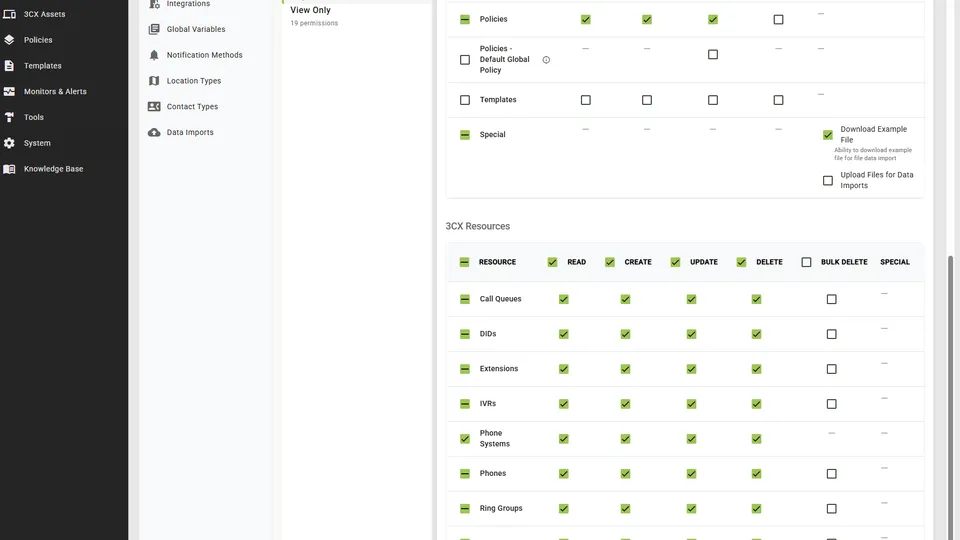
Controvo now has an explicit bulk delete permission, separately controllable per role. It covers Extensions, Phones, and SIP Trunks — any asset where mass deletion could take a client’s business offline. Enabling it automatically implies read, create, update, and delete, because bulk delete without those makes no sense. But you can grant full CRUD access to an asset without granting bulk delete. The operations are no longer the same permission.
The Global Policy Problem
Policy management is one of Controvo’s core features. You build a configuration template, assign it to phone systems, and Controvo keeps those systems in compliance. That’s powerful — and it’s exactly why global policy updates need to be treated differently.
We know this from experience. One of our own engineers was making a policy change for a specific customer and edited the Default Global Policy instead. An easy mistake — the UI made both policies accessible in the same workflow, and the global one was just a click away. What saved us was that we had policy change notifications enabled. We caught it immediately and reverted the change before it propagated.
Without those notifications, the Default Global Policy would have pushed to every extension we manage. Every voicemail would have been set to send an email copy and then delete the original from the system. Across every customer. All at once.
That incident is directly why the Default Global Policy now has its own permission. Applying a policy to one customer is a scoped change. Editing the global default touches everything. The blast radius of a mistake is incomparable, and the UI proximity of the two operations was a problem we needed to solve at the permission level — not just with better labels or warnings.
Controvo now separates the permission to edit the Default Global Policy from the permission to manage policies on individual customers. An admin who configures policies for specific clients doesn’t automatically have the ability to change what applies globally.
Why This Matters in Practice
The argument for least-privilege access is usually framed around security — limiting what a compromised account can do. That’s valid. But for MSPs, the more immediate argument is operational.
You have techs at different experience levels. You have people who are careful and people who move fast. You have late Friday afternoons and stressful incidents where attention slips. The permission model shouldn’t assume everyone who needs admin access also needs access to the operations that are hardest to recover from.
Setting up granular roles used to be tedious enough that most teams didn’t bother. Controvo added role copying in March — build one role correctly, copy it as a starting point for the next one. The friction of doing this right is lower than it’s ever been.
Set It Up
If you’re a Controvo pilot partner, review your role configurations. The bulk delete and global policy permissions are now independently controllable — make sure they’re assigned deliberately, not by default.
Already in the pilot? Log in and review your roles. Not yet? Apply for the pilot program.