
Key takeaways:
- Call routing logic in 3CX is spread across IVRs, ring groups, call queues, and individual extensions — there’s no built-in way to see the full picture
- Controvo’s Call Flow Studio generates interactive visual diagrams of your call routing paths
- Filter by time of day to see exactly how calls route during business hours, after hours, and holidays
- Not just a diagram — it’s a live editing tool. Right-click any node to modify extension settings directly from the visual
- No more manually building call flow maps in Visio or Gliffy — diagrams are generated automatically from live system data
- Export call flow diagrams as clean PNG images for documentation, client handoffs, or internal reviews
The Problem With Call Routing You Can’t See
Ask any 3CX reseller to explain how calls route through a client’s system and they’ll either pull up a spreadsheet, open three or four admin console screens, or just start talking from memory. None of those are reliable.
The routing logic in a 3CX system isn’t stored in one place. It’s distributed across IVRs, ring groups, call queues, forwarding rules, and individual extension settings. The main number hits an IVR. Press 1 for sales — that goes to a ring group. Nobody picks up — it forwards to a queue. Queue times out — it hits a voicemail. After hours? Different IVR entirely. Holidays? Another branch.
Every one of those routing decisions is configured in a different screen. There’s no single view that shows you the full path a call takes from the moment it arrives to the moment it lands somewhere. Which means:
- Troubleshooting takes longer than it should. A client says calls aren’t reaching the right person after hours. You have to manually trace through every hop to figure out where the routing breaks.
- Onboarding new techs is painful. You can hand someone a spreadsheet showing how a system is supposed to be configured, but that doesn’t show them how calls actually flow.
What Controvo Built
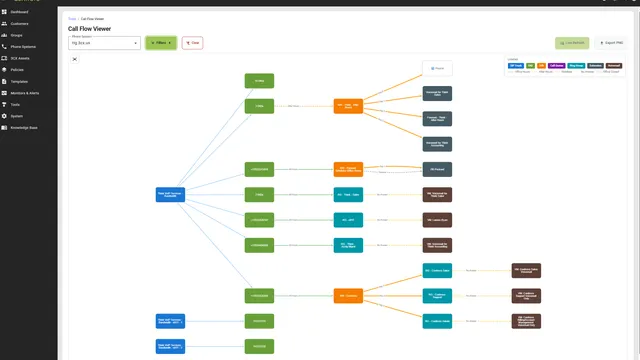
The Call Flow Studio generates an interactive visual diagram of call routing for any phone system in your portfolio. Open it, select a phone system, and see every path a call can take — rendered as a node-and-edge diagram you can explore, filter, and export.
Every entity in the call path gets its own node: SIP trunks, DIDs, IVRs, ring groups, call queues, extensions, and voicemail boxes. Connections between them show exactly how calls route, including key press forwards, timeouts, and fallback conditions. The result is a map of your client’s call routing that you can actually look at instead of holding in your head.
Filter by Time of Day
Call routing changes throughout the day. Business hours, after hours, holidays — most 3CX systems behave differently depending on when a call comes in. The Call Flow Studio lets you filter by time of day so you see exactly the routing that applies right now, or at any specific time.
Toggle between All Hours, Office Hours, After Hours, and Holidays. The diagram updates instantly, showing only the paths that are active during that period. When a client calls at 9 PM and says “my calls aren’t going to the right place,” you can pull up the after-hours view and see exactly where they’re going.
Auto-collapse keeps the filter panel out of your way when you’re focused on the diagram. It opens when you need it and tucks away when you don’t.
See It. Edit It. Done.
Most call flow tools give you a read-only picture. The Call Flow Studio is a live editing surface. Every node in the diagram is interactive — right-click any extension, ring group, or IVR and open its configuration directly from the visual. Change a forwarding rule, update a timeout, reassign a queue member — without ever leaving the diagram.
This is the difference between a documentation tool and an operational one. You’re not generating a diagram to look at and then switching to the admin console to make changes. You’re diagnosing and fixing in the same view, in real time. Spot a misconfigured after-hours forwarding rule? Right-click, fix it, and the diagram reflects the change immediately.
For technicians on a call with a frustrated client, this workflow matters. Trace the problem in the diagram, fix it on the spot, and confirm the routing is correct — all while the client is still on the line. No tab-switching, no hunting through menus, no “let me call you back after I check the settings.”
Hide the Noise
Not every extension matters for every conversation. Some systems have dozens of extensions that never receive inbound calls — shared parking lots, lobby phones, conference rooms. The Call Flow Studio lets you hide orphan nodes that aren’t part of any active routing path, so the diagram shows you what matters.
Combined with the time-of-day filter, you can strip a complex system down to just the paths you care about. Business hours routing for the main number? Filter to office hours, hide orphans, and you’re looking at exactly the call flow that handles 90% of inbound traffic.
Why This Matters for MSPs
Every tool an MSP uses should make the invisible visible. 3CX call routing is one of those things that works fine until it doesn’t — and when it doesn’t, the first step is always figuring out how it’s supposed to work in the first place.
The Call Flow Studio eliminates that first step. The routing is visible, interactive, and editable — right from the diagram. You can hand it to a new tech and they understand the system in minutes instead of hours. You can show it to a client and they see exactly what they’re paying for. You can pull it up during a live troubleshooting call, trace the issue, and fix it before you hang up.
No more spreadsheets. No more clicking through five admin screens to trace one call path. No more explaining routing logic from memory. And no more switching between a read-only diagram and the admin console to actually change something.
Try It
The Call Flow Studio is available now under Tools in Controvo. Select any phone system, and the diagram generates automatically. Log in to Controvo and try it. Not in the pilot yet? Apply for early access.