

Key takeaways:
- 3CX call logs answer what happened on a call, but not why it routed where it did
- Pilot partners told us they had little or no visibility into how many minutes each client was actually using
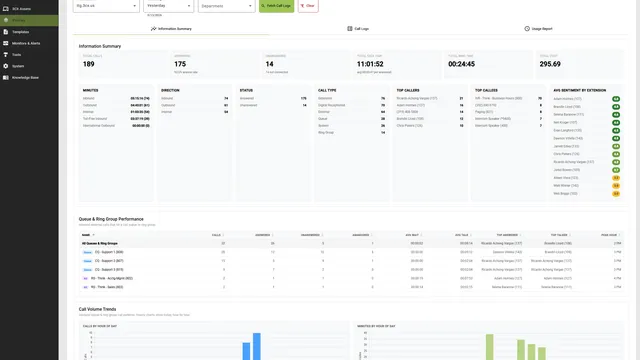
- Call Logs is a new tool that pulls activity from one or more phone systems and answers both questions in one place
- Every call has a visual flow diagram that shows every hop a call took, color-coded by outcome, with reasons like “no answer · 18s”
- Customer Minutes Report rolls talk-time minutes up per customer for usage-based billing
- Sentiment, full transcription, and recording playback are surfaced inline on every call
The Call That Ended in the Wrong Voicemail
You’ve had this conversation. A client calls and says, “I called our main number yesterday at 4:50 PM and somehow ended up in Brian’s voicemail. Brian doesn’t even handle support.”
You open 3CX, find the call, and see what it says it did: Answered by Extension 105, duration 38 seconds. That’s the what. It doesn’t tell you why. To answer that, you start clicking. Main IVR, time conditions, ring group settings, queue overflow rules, extension forwards. Five admin screens later, you maybe have a theory.
That’s not a workflow. That’s archaeology.
Pilot partners told us the same thing over and over: the existing 3CX call log tells you a call happened, but it doesn’t show you the path. Without the path, every routing question turns into a manual hunt across half a dozen settings screens.
The Other Call Nobody Could Answer
Then there’s the billing question. We talked to partners who were charging some of their clients on a usage basis: per-minute, per-seat with overage, or just trying to figure out which clients were heavy users so they could price tiers accurately.
Every one of them was guessing. The 3CX call history exists per phone system. If a partner manages thirty clients, pulling minutes-by-customer means thirty CSV exports, thirty pivot tables, and one bad number away from billing somebody wrong. Most just didn’t bother. The minutes stayed invisible, and the pricing stayed flat. That works until a heavy client starts costing more in trunks than they’re paying.
Two completely different problems, same root cause: the data is there, but nothing surfaces it in a usable form.
What Controvo Built
Call Logs is a new tool under Advanced Tools. Pick one or more phone systems, pick a date range, and Controvo pulls every call across all the PBXs into a single view.
From there it answers both questions.
Visual Call Flow For Every Single Call
Click any call. A diagram opens that shows every leg the call took, in order: SIP trunk in, IVR hop, time condition, queue, ring group, extensions that rang, who answered or why nobody did. Each edge is animated and labeled with the reason it moved on: “no answer · 18s”, “queue timeout”, “forwarded to voicemail”. Color coding tells you at a glance whether each step was answered, abandoned, forwarded, or terminated.
That client call from 4:50 PM? You don’t trace it through five admin screens anymore. You open the call, look at the diagram, and the answer is right there: the IVR’s after-hours condition kicked in two minutes earlier than the front-desk thought it did, queue overflow pointed at the wrong extension, and that’s where Brian got the call.
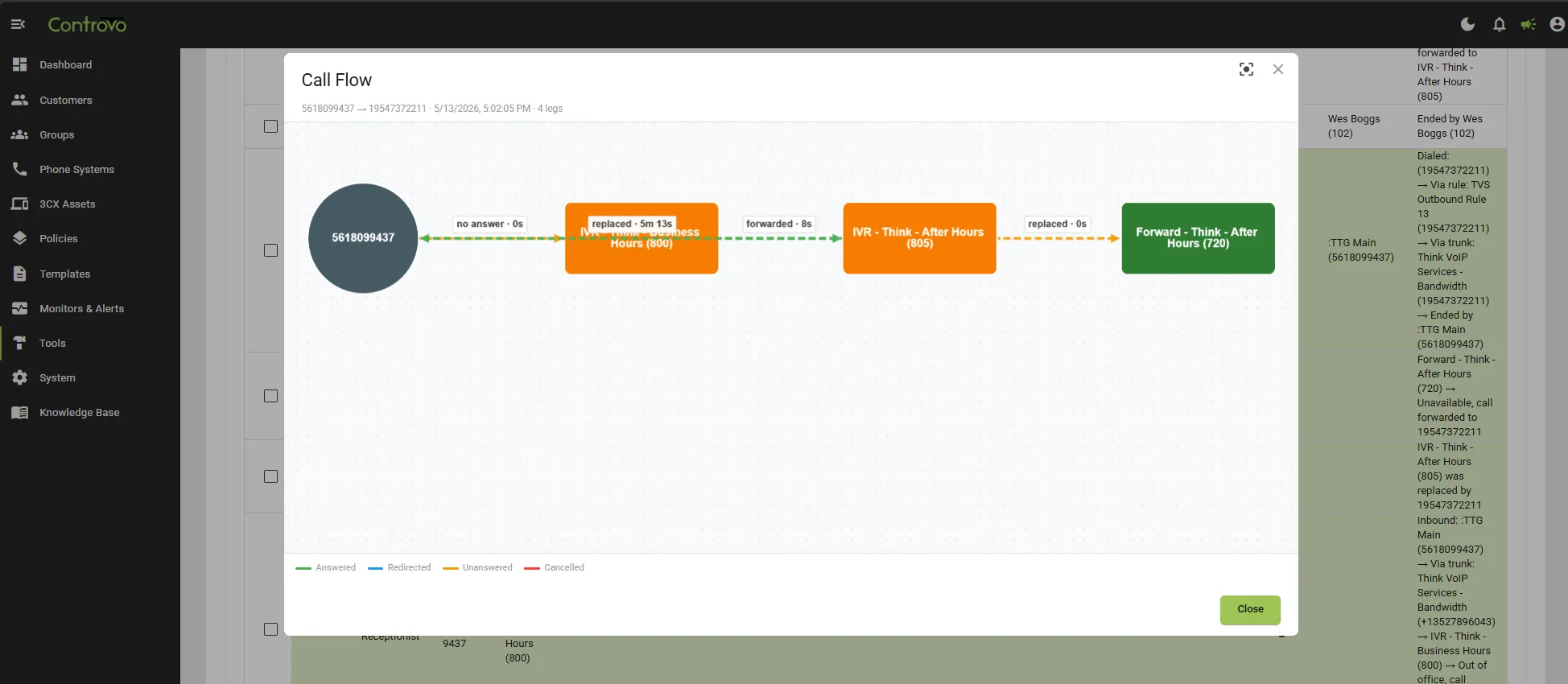
This is the same Cytoscape engine that powers Call Flow Studio, but instead of showing the potential paths through a system, it shows the actual path a single call took. Side by side, the two tools answer “how can calls route?” and “how did this call route?”, the two questions that show up in every routing investigation.
Customer Minutes Report
The billing answer is just a report. Pick the date range, pick the customers, get a clean per-customer roll-up of talk-time minutes across all of that customer’s phone systems.
No CSV exports. No pivot tables. No worrying that you forgot one of the customer’s PBXs. The number you bill from is the same number every time.
Partners doing per-minute billing now have an audit trail. Partners doing flat-rate billing finally have data to validate their tiers, or to spot the client whose minutes have tripled since you set their price two years ago.
Queue & Ring Group Performance, Done Correctly
A bonus most partners didn’t even ask for, but immediately recognized: per-queue answered vs. unanswered counts that handle forwarding correctly.
If Queue A times out and forwards to Queue B, where it gets answered, the existing 3CX reports tend to either double-count or attribute the answer to the wrong queue. Call Logs walks the legs of each call and gives the unanswered count to Queue A (which failed to deliver) and the answered count to Queue B (which actually did). The queue performance numbers you see are the ones you’d compute by hand if you had the time.
Sentiment, Transcription & Recording, Inline
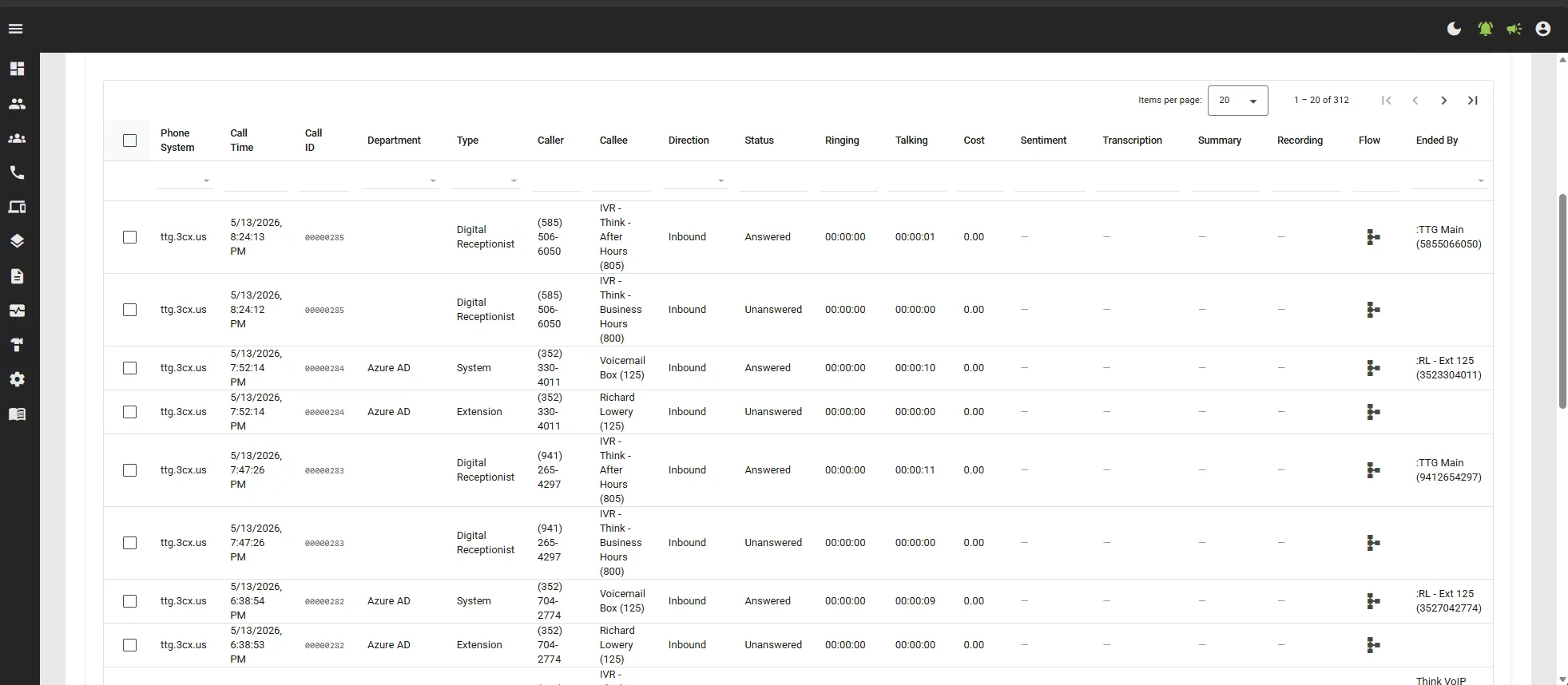
Every call row surfaces AI-generated sentiment, full transcription, and recording playback right where you’re already looking. You don’t open the call to read the transcript, and you don’t navigate elsewhere to play the audio. They’re columns on the table, expandable on the row.
For partners doing QA, training, or post-incident review on individual calls, this collapses a multi-tool workflow into a single screen.
Multi-PBX Export
Select multiple phone systems (or hit Select All), pick a date range, and export a per-PBX CDR file in one click. The slow-fetch UX keeps you informed when you’re pulling a big range, so nothing looks frozen.
For partners who pipe call data into a separate analytics or billing system, this replaces a per-PBX scavenger hunt with a single action.
Why This Matters
The two stories at the top of this post aren’t edge cases. They happen every week to every reseller running more than a handful of clients.
The routing question (“why did the call end up there?”) costs you a tech support escalation every time it comes up. Without a tool, the answer is fifteen to thirty minutes of clicking, plus the risk that you guess wrong and the client follows up to tell you the routing is still off.
The billing question (“how many minutes is this client actually using?”) costs you margin on heavy clients and credibility on the next pricing conversation. Without data, every renewal is a negotiation against your own guess.
Call Logs makes both questions one click each. The data was already in the systems. The work was in surfacing it.
Try It
Call Logs is available now under Advanced Tools in Controvo. Connect a phone system, pick a date range, and you have everything in this post. Open Controvo. Not on Controvo yet? Get started.
For the full list of what shipped with Call Logs and the rest of the month, see the May 2026 release notes.