

Key takeaways:
- Call quality data is only useful if it’s already there when you go looking, so Controvo lets you turn monitoring on and leave it on
- Enable call quality monitoring in bulk: select extensions from the Phone Systems table and start monitoring in a single action
- Set a monitoring window of an hour or a day, or run it indefinitely so reporting is always available
- Review results in aggregate across a time range, or drill into a single extension right from the Extensions table
- Pull the call quality report for a specific call log whenever one exists
The Problem: Call Quality Data You Don’t Have Yet
A client calls: “Our calls were breaking up yesterday afternoon.” You open 3CX to investigate and find nothing, because call quality monitoring wasn’t running yesterday afternoon. The data you need doesn’t exist, and you can’t go back and collect it.
That’s the catch with monitoring call quality on demand, one call at a time. You only get data for the calls you thought to watch. For an MSP managing dozens of 3CX systems, you can’t predict which extension will have a problem tomorrow. By the time you know to look, the call is over and the evidence is gone.
The fix is to stop relying on memory and let monitoring run all the time.
Turn It On Everywhere, At Once
Controvo lets you start Call Quality Monitoring straight from the Phone Systems table. Select the extensions you care about (or all of them), choose how long to monitor, and start. One action covers as many extensions as you select, across your managed systems.
You don’t enable monitoring one extension at a time, and you don’t log into each PBX to do it. Pick your scope and start. The same bulk controls are available on the Extensions table, so you can flip monitoring on for a whole group in one pass.
Monitor for an Hour, or Forever
When you start monitoring, you choose the window. Chasing a specific extension after a reported issue? Run it for an hour. Standing up a new client and want a baseline? Run it for a day.
Or set no end at all. Run monitoring indefinitely and the data is always being collected. When the “calls were breaking up yesterday” ticket comes in, the report is already waiting, because monitoring never stopped. You stop scrambling to capture call quality data and just have it.
See the Whole Picture, or One Extension
Collected data is only useful if you can actually read it. Controvo gives you two ways in.
Aggregate Reporting
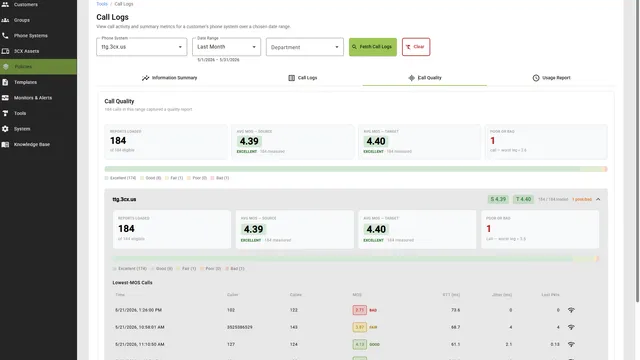
Review every call quality report across a time range in one place. See how your systems are performing in aggregate. Spot the bad days and the extensions that keep showing up, without opening reports one at a time.
Per-Extension, Right Where You Work
Per-extension call quality data appears directly on the Extensions table, defaulting to today’s data. You don’t open a separate tool to check how a single extension is doing. It’s right there on the page you already use to manage extensions. Wherever a report exists for an extension, you see it next to the extension itself.
And when you’re chasing a specific complaint, pull the call quality report for an individual call log whenever one exists.
Why This Matters for MSPs
Call quality is the thing clients notice first and forgive last. “The phones sound bad” is a renewal risk, not just a ticket.
The trouble is that call quality problems are usually intermittent and environmental: a saturated uplink at 4 PM, jitter that only shows up under load. You can’t diagnose what you didn’t measure. Running monitoring continuously across every extension means that when a problem surfaces, you have data to read instead of an apology to give. Paired with Controvo’s proactive 3CX monitoring for CPU, RAM, and network health, you can see why calls sound the way they do.
For a closer look at how Controvo centralizes 3CX management, see our 3CX RMM overview.
Getting Started
Call quality monitoring and reports are available now. Open the Phone Systems table, select your extensions, start monitoring, and leave it running. Already in the pilot? Log in and turn it on. Not yet? Get started to get early access.