
Key takeaways:
- Controvo now integrates with ElevenLabs to generate text-to-speech IVR prompts in natural-sounding AI voices, with no recording booth and no outsourced voice talent
- Add your ElevenLabs API key to turn it on, and prompts are generated and ready to attach to 3CX
- Standardize your sound: favorite the voices and models your organization prefers, and disable the ones you don’t want engineers using
- Coming next: fully automated voicemail greetings and dial-by-name directory recordings, generated without anyone writing a script
The Problem: Every Prompt Is a Production
Every 3CX system is full of recorded audio: IVR menus, voicemail greetings, hold messages, dial-by-name directories. And every recording is a small production. Someone writes the script, someone records it (or you pay for voice talent), someone converts the file to the right format, someone uploads it. Multiply that across a portfolio of clients and “just update the greeting” turns into a half-day of work nobody wants to own.
The result is prompts that go stale: the holiday hours from two years ago, the employee who left, the menu option that points nowhere. Re-recording is enough of a chore that it doesn’t happen.
Generate Prompts From Text, In Controvo
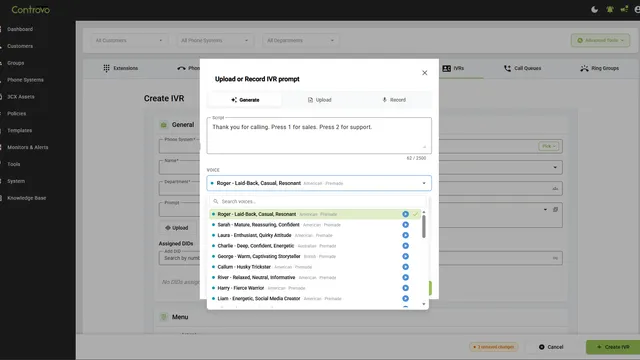
Controvo now integrates with ElevenLabs to generate text-to-speech prompts directly inside the app. When you’re editing an IVR, the prompt dialog opens on a Generate tab. Type the script ( “Thanks for calling. Dial 1 for sales, dial 2 for support…”), pick a voice, and generate. You get a natural-sounding AI voice (not the robotic text-to-speech of a decade ago) ready to attach to the IVR. Want to fine-tune it? Advanced settings expose the model, stability, and similarity. Prefer a human take? The same dialog’s Upload and Record tabs are right there.
Generating the audio is only half of it. From the same screen, Controvo converts the file to the format 3CX expects, lets you play it back to confirm it sounds right, and uploads it straight to the IVR. No exporting, no re-encoding, no separate upload step. A line of text becomes a live 3CX prompt without you ever leaving the dialog.
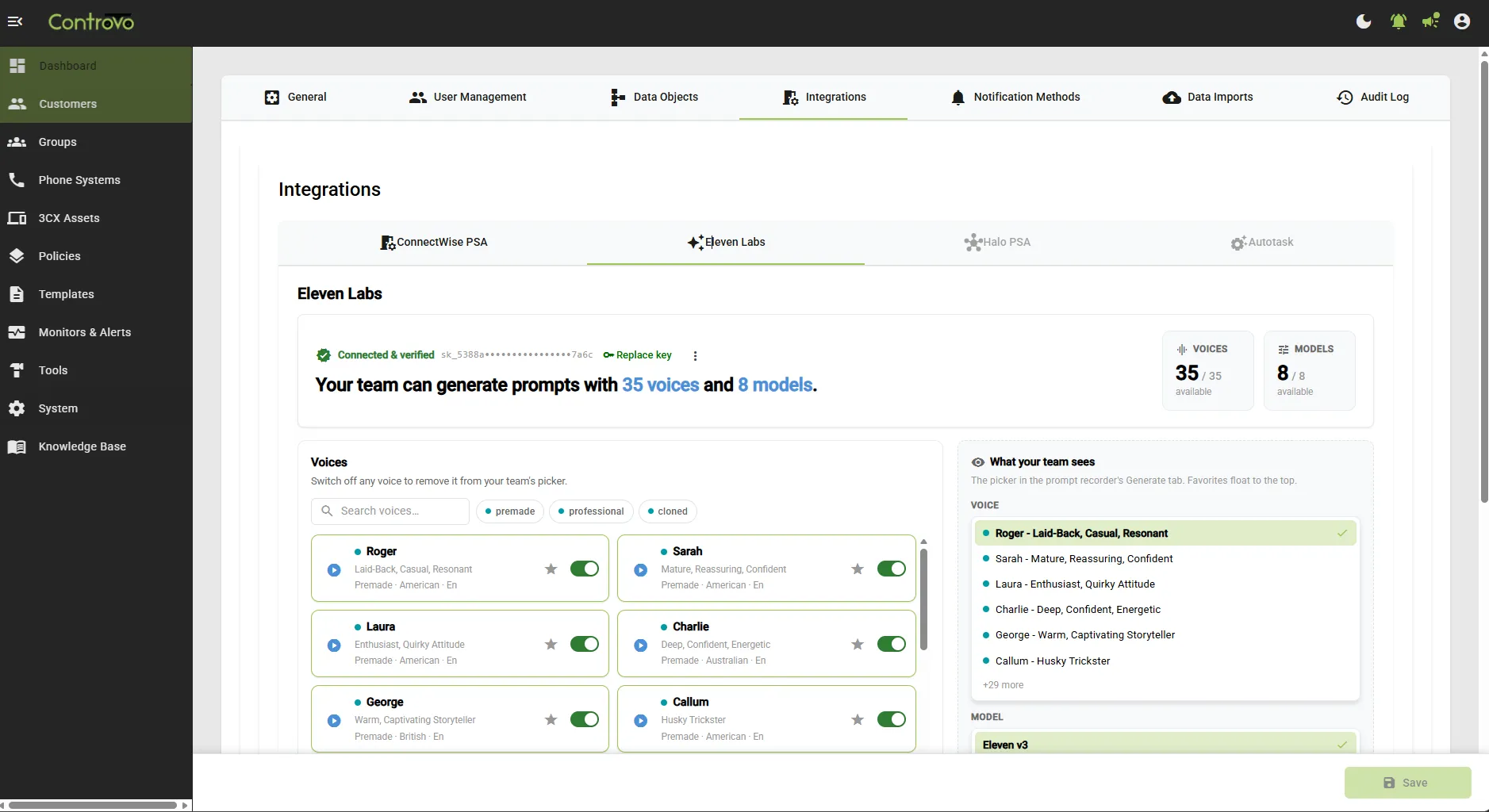
Setup is a one-time step under System → Integrations → Eleven Labs: paste your ElevenLabs API key, and Controvo verifies it and shows how many voices and models your account can use. After that, generating a prompt is a few seconds of work instead of a recording session.
Keep Your Sound Consistent Across Clients
When anyone can generate a voice, the next problem is that everyone generates a different one. One engineer picks a formal narrator, another picks something casual, and your clients’ phone systems stop sounding like they came from the same provider.
Controvo gives you organization-level control:
- Star your favorites. Favorite the voices and models your organization prefers, and they float to the top of the picker your engineers see in the Generate tab. The house style is right there in front of them.
- Switch off the rest. Toggle off any voice you don’t want in the picker, and block legacy models so your team stays on the best-sounding output. Governance, not a style guide nobody reads.
For an MSP, that consistency is part of the product. Every greeting, on every client’s system, sounds like you meant it.
What’s Coming: Prompts That Write Themselves
Generating from text is the starting point. Next we’re removing the script-writing, too.
We’re building fully automated prompt generation for recordings that follow a predictable pattern:
- Voicemail greetings. Generate a complete, on-brand voicemail greeting for an extension automatically, without anyone drafting the wording by hand.
- Dial-by-name directory recordings. Produce the spoken-name recordings a dial-by-name directory needs, generated automatically across your extensions instead of recorded one person at a time.
The goal: the prompts that are pure boilerplate today should generate themselves, so your team only writes the audio that genuinely needs a human. Both items are on the roadmap and build directly on the ElevenLabs integration shipping now.
Why This Matters for MSPs
Audio quality is brand quality. A crisp, consistent IVR makes a small business sound established; a muffled cell-phone recording makes it sound like a side project. Until now, getting that polish meant paying for voice talent or settling for whatever someone could record at their desk.
Bringing prompt generation into Controvo, alongside the tools you already use to manage 3CX, turns professional audio from a special project into the default. You can still upload and convert your own audio when you’d rather use a human recording, so the path from script to 3CX prompt stays inside the app either way.
Getting Started
The ElevenLabs integration is available now. Under System → Integrations → Eleven Labs, add your API key and set your preferred voices and models, then open any IVR and generate your first prompt from the Generate tab. Already in the pilot? Log in and connect ElevenLabs. Not yet? Get started to get early access.